
Zoom Player 特別設計了比例調整的功能,為的就是能夠即時精確調整影片於電腦桌面撥放時的解析度,你還可以任意調整放映區域大小及背景顏色、放大 / 縮小。除此之外,它真是一個非常棒的影片(VCD、DVD)播放工具,停止、暫停..等一般功能就不用說了,最特別的是可以:快轉播放、慢速播放、建立播放清單。
使用 Zoom Player,您可以立即將任何 PC 轉換為家庭娛樂中心 (HTPC) ,而無需專門的硬體或作業系統。 多語
軟體介紹
Zoom Player MAX 22.5.0
一款強大的影音播放軟體,提供一般影片播放、音樂播放、網路電台播放…等多種功能。
授權性質:共享
使用限制:請見該軟體說明
介面語言:多國語言
作業系統:Windows(含Win11)
點閱次數:87,225
下載次數:24,916
檔案大小:95.56 MB
更新時間:2026/7/9 上午1:02:23
官方網站: DVD Informatrix
軟體簡介
詳細說明介紹
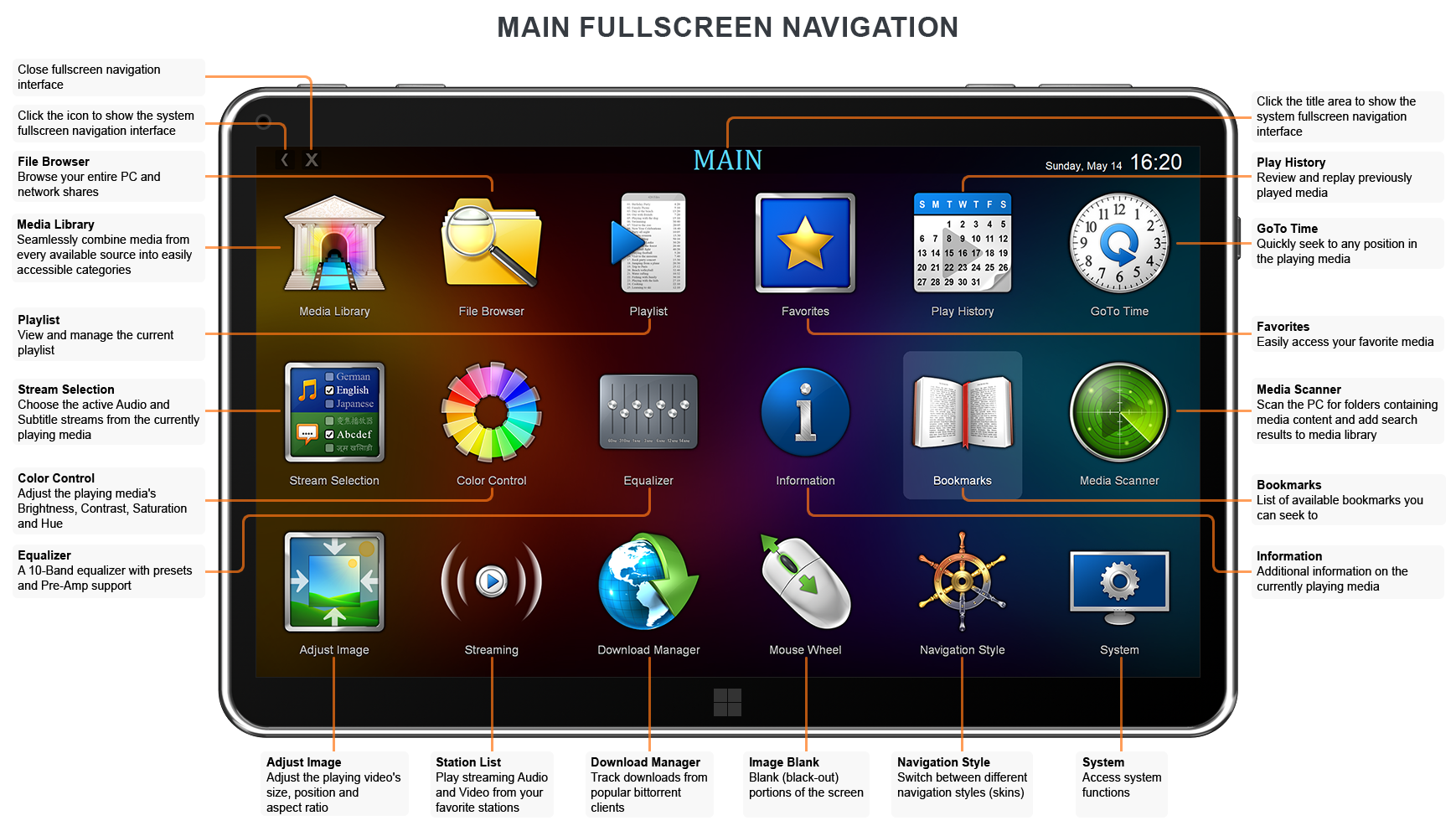
Zoom Player 的經典媒體播放器功能是一個強大的媒體中心全螢幕界面,設計用於五個簡單的鍵(上/下/左/右/選擇)。五鍵系統提供簡單快速的導航,同時保持對高級界面的完全瀏覽權限,例如媒體庫、檔案瀏覽器、播放列表編輯器、顏色控制、音訊均衡器、書籤、播放歷史等等。
支援的影音格式 :
- DVD ‧ BluRay(解密的主要電影播放)‧ Matroska (MKV) ‧ H.264 和 AVCHD (MPEG4 AVC) ‧ H.265 和 HEVC
- MPEG2 傳輸 (TS/TP/TSP/TRP/M2T/M2TS/MTS/PVA/PVR /TOD) ‧ XVID ‧ DIVX ‧ AVI ‧ Flash Video (FLV)
- Windows Media (WMV/ASF) ‧ QuickTime (MOV/HDMOV) ‧ WebM ‧ Ogg Movie (OGM) ‧ Theora (OGV)
- Real Media (RM/RMVB) ‧ VideoCD (VCD) ‧ Super VideoCD (SVCD) ‧ MPEG (MPG) ‧ MPEG2 節目 (M2V/VOB/MOD)
- MPEG4 (SP/ASP) ‧ MPEG4 ISO (MP4) ‧通用交換格式 (GXF) ‧ 素材交換格式 (MXF)
- 媒體中心 DVR (DVR-MS) ‧ 攝像機 (MOD/TOD ) ‧ 數位影音 (DV) ‧ DVCPRO ‧ VP3 ‧ VP6 ‧ VP7 ‧ VP8 ‧ VP9
- Motion JPEG (MJPEG) ‧ Motion JPEG 2000 (MJPEG2000) ‧ Flash (SWF) ‧ 手機 3GPP (3GP/3G2) ‧ FLIC (FLI/FLC ) )
支援的音訊格式 :
- MP3 ‧ 免費無損音訊編解碼器 (FLAC) ‧ OPUS (OPUS) ‧ 高級音訊編碼 (AAC) ‧ Windows Media (WMA)
- OGG Vorbis (OGG) ‧ CD-Audio (CDA) ‧ 手機 (AMR) ‧ Matroska (MKA) ‧ Wave Audio (WAV) ‧ SHOUTcast(流媒體)
- Dolby Digital (AC3) ‧ Digital Theatre Surround (DTS) ‧ Monkey Audio (APE) ‧ Real Media (RA) ‧ MusePack (MPC)
- WavPack (WV) ‧ OptimFROG (OFR) ‧ Shorten (SHN) ‧ 真音訊 (TTA) ‧ LPCM ‧ MIDI ‧ Apple 無損音訊編碼 (ALAC)
- AIFF ‧ MO3 ‧ IT ‧ XM ‧ S3M ‧ MTM ‧ UMX
支援的交互式格式 :
- DVD ‧ Hypertext Markup Language (HTML) ‧ Flash (SWF)
支援的圖片格式 :
- JPEG (JPG) ‧ PNG ‧ GIF ‧ BMP ‧ PSD ‧ TIFF ‧ ICO ‧ TGA ‧ PSD ‧ FAX ‧ WMF ‧ EMF ‧ JFIF ‧ RLE ‧ WIN ‧ VST ‧ VDA ‧ ICB
- PCC ‧ SCR ‧ RPF ‧ RLA ‧ SGI ‧ BW ‧ EPS‧ PCX ‧ PDD ‧ PPM ‧ PGM ‧ PBM ‧ CEL ‧ PIC ‧ PCD ‧ CUT ‧ PSP ‧ PN
Zoom Player 軟體內有提供多國語言包可供下載及安裝,目前有兩種方式可以下載安裝多國語言包。
1.在安裝過程中,有 Install Center 選項,選擇 Languages 選項,在選擇所要下載及安裝的語言包即可。
2.啟動該軟體後在 Basic Options 中選擇 Language,再點選 Download Additional Languages,選擇 Languages 選項,在選擇所要下載及安裝的語言包即可。
下載及安裝語言包後再次重新啟動該軟體,啟動該軟體後在 Basic Options 中選擇 Language,再點選所要的語言包後再次重新啟動該軟體即可。
版本比較表 :
| FREE | MAX/STEAM | Feature list | ||
| - | O | Media Library JukeBox mode meta-data scraping for Movie/TV/Music posters, backdrops, still images, title, description, genre, cast, content-rating and more! | ||
| - | O | Media Library YouTube (Channels/Searches/Trends/Playlist) integration. | ||
| - | O | Media Library icons displaying the content-rating, media format, video codec, video resolution, audio codec and audio channels. | ||
| - | O | Fully customizable Media Library Sound-FX system. | ||
| - | O | Media Library RSS feed reader. | ||
| - | O | Single action audio device switching (e.g. speakers to headphones). | ||
| - | O | Download subtitles through 'OpenSubtitles.org'. | ||
| - | O | Torrent Download & Tracking through integration with the qBittorrent client. | ||
| - | O | Use XBOX 360 and compatible controllers as remote control with custom, user-assigned functionality. | ||
| - | O | Remote Control for Android with Virtual Mouse-pad. | ||
| - | O | Custom actions when clicking 'Hot' screen corners (function/extended function/execute app). | ||
| - | O | Blu-Ray Decrypted Main-Movie Playback (with subtitles). | ||
| - | O | Automation user-selected action when connecting/disconnecting an additional monitor. | ||
| - | O | Automation user-selected action when detaching/attaching a "2 in 1" laptop's display. | ||
| - | O | Automation user-selected action when switching between tablet and mouse modes (win10). | ||
| - | O | Thumbnail preview when hovering with the mouse cursor over the timeline. | ||
| - | O | Fullscreen media center navigation Password protected categories. | ||
| - | O | Customizable Mouse Gestures. | ||
| - | O | Display chapters/bookmarks position directly on the timeline. | ||
| - | O | Media Scheduler with remote TCP/IP network based programming support. | ||
| - | O | Automatically restore the previously active subtitle track on replay. | ||
| - | O | Automatically restore the previously active audio track on replay. | ||
| - | O | Use Direct3D PixelShaders to enhance videos with macros to easily switch between shader script presets. | ||
| - | O | Use DirectShow filters directly from DLLs (without registering with OS). | ||
| - | O | Remotely create and manage playlists without affecting current playback. | ||
| - | O | Create Mobile-Phone RingTones from playing media. | ||
| - | O | GuardDog (Auto-Restart if the player locks up). | ||
| - | O | Network Keep-Alive feature (prevent network drives from disconnecting on inactivity). | ||
| - | O | Scene-Cut Interface (Dynamic, Virtual Audio/Video editing). | ||
| - | O | Video Wall (Span Videos across multiple monitors using the EVR Renderer). | ||
| - | O | Non-Linear 16:9/4:3 video scaling using EVR (Enhanced Video Renderer). | ||
| - | O | Support for Local Configuration file (easily run different configurations/instances on the same PC). | ||
| - | O | Video Orbiting (Prevents screen-burns). | ||
| - | O | Auto-Execute external programs Running/Closing the player. | ||
| - | O | Extended Command Lines "/x", "/y", "/w", "/h", "/nCols", "/nRows", "/Col", "/Row". | ||
| - | O | Extended Command Lines "/browse", "/func", "/exfunc", "/config", "/multinst", "/seek". | ||
| - | O | Extended Command Lines "/datapath", "/winname", "/connecttcp", "/sharepath". | ||
| - | O | HTML Interactivity. | ||
| - | O | Flash Interactivity. | ||
| - | O | QuickTime Interactivity. | ||
| - | O | Copy current play position to the clipboard. | ||
| - | O | Fullscreen media center navigation interface with easy to use controls for both Home Theater PCs (HTPC) and Tablets (or other touch devices). | ||
| - | O | Fullscreen media center navigation thumbnail view with kinetic smooth scrolling and customizable content-based layout. | ||
| - | O | Advanced Smart Play controls (Create your own Smart Play profiles, select & configure custom decoders for each media format). | ||
| - | O | Fullscreen media center navigation Safe Mode (hide dangerous functions from inexperienced users). | ||
| - | O | Fullscreen media center navigation custom background images. | ||
| - | O | Real-Time manual audio re-synchronization with optional initial synchronization value. | ||
| - | O | Communication & Control API (TCP/IP, WinAPI's SendMessage or COM), supported by many 3rd party applications. | ||
| - | O | Windows Media (WMV/WMA) DRM Support. | ||
| - | O | Playlist Power Manager (enhanced search/playlist manipulation). | ||
| - | O | Control Zoom Player through a Web Interface (web remote). | ||
| - | O | Audio Visualizations (Sonique, Windows Media Player plugin support). | ||
| - | O | Mouse Wheel Tilt (left/right) support with selectable functions (Windows VISTA or newer). | ||
| - | O | Custom mouse click & scroll functions. | ||
| - | O | Password protected options dialog, preventing other people using the computer from modifying your configuration. | ||
| - | O | Blank Secondary Monitors (when switching to fullscreen or by calling a function). | ||
| - | O | Automatic Audio and Subtitle media file stream selection. | ||
| - | O | Play History (Remember Date, Audio/Subtitle Track, Restore previous playback position and more). | ||
| - | O | Play History Privacy (control how previously played content is stored & displayed). | ||
| - | O | Automatically restore volume level on replay with video files. | ||
| - | O | Automatically restore volume level on replay with audio files. | ||
| - | O | Share play history on a network path to resume playback from different machines. | ||
| - | O | Lock the On Screen Display to a region of the screen. | ||
| - | O | Auto-Execute external programs when a PAL/NTSC DVD disc is detected (prior to playing) and when the DVD playback is stopped. | ||
| - | O | Map network paths into the File Browsing Media Center navigation interface. | ||
| - | O | DVD Password Protected Parental Control. | ||
| - | O | DVD Trailers interface allowing you to play trailers prior to starting the movie. | ||
| - | O | Automatic Aspect Ratio, Video Size and Blanking depending on the DVD type (Fullscreen, Letterbox or Anamorphic). | ||
| - | O | Reload & Replay media files as they are being saved. | ||
| - | O | Closed Captions Support in Media Files. | ||
| - | O | Use any DirectShow filter as a custom Video Renderer. | ||
| - | O | Customize the functions assigned to keyboard navigation (up/down/left/right/enter & space keys). | ||
| - | O | Override the playlist editor's font with custom fonts. | ||
| - | O | Pattern Calibration System with White Wash Anti Burn-in mode. | ||
| - | O | Enhanced Screen Saver controls (Computer generated backgrounds, image slideshows and power saving modes). | ||
| - | O | Integrated eMule/uTorrent/qBittorrent file tracker (track download progress within the fullscreen navigation interfaces). | ||
| - | O | Customize the background image visible when nothing is playing. | ||
| - | O | Customize the background image used when playing audio when no folder image exists. | ||
| - | O | Add custom functions to the Task-Bar right-click menu (Windows 7 or better). | ||
| - | O | Extended Command Lines "/lockfs", "/tcp". | ||
| - | O | Create Contact Sheet (Thumbnail index). | ||
| - | O | Multiple Customizable Context Menus with extensive support for both DVD and Media modes. | ||
| O | O | No bloat, intuitive interface with a user-friendly design. | ||
| O | O | Skins for every resolution, including 4K screens. | ||
| O | O | Install Center application, capable of detecting and securely installing up-to-date decoders, missing system components and language packs to improve stability and versatility. | ||
| O | O | Support for legacy and cutting-edge Video Rendering technologies (Overlay, VMR7, VMR9, EVR, Haali, MadVR). | ||
| O | O | Windows 7 (or better) Task-Bar position coloring. | ||
| O | O | Windows 7 (or better) controls on the preview thumbnail (Mute, Play/Pause, Next/Previous Track). | ||
| O | O | 10-Band Equalizer with Digital PreAmp and Presets. | ||
| O | O | DVD Playback from Disc, Hard Drive or network connection. | ||
| O | O | Quickly jump between multiple saved positions using media Chapters (or DVD Bookmarks). | ||
| O | O | Go-To Interface to quickly and accurately seek into any position within a media file. | ||
| O | O | Automatically Extract & Play Archived (zip/rar/7z/etc) content. | ||
| O | O | Video Post-Processing (DeInterlacing, Sharpening, etc). | ||
| O | O | Play incomplete AVI files. | ||
| O | O | Play files locked by third party programs. | ||
| O | O | Powerful, category based Media Library interface. | ||
| O | O | Automatically play multi-part media files, including GoPro sequences. | ||
| O | O | AB-Repeat (Repeat a section of the playing media in a loop). | ||
| O | O | Choose from Multiple DVD Audio & Video decoders for improved compatibility and reliability. | ||
| O | O | Smart DVD Bookmarking tool, including auto-loading bookmarks. | ||
| O | O | Auto-Remember DVD position per-disc (each DVD's position saved separately). | ||
| O | O | Multiple DVD play speeds with adjustable speed values. | ||
| O | O | Preferred DVD language selection (Audio, Video, Subtitle and DVD Menus). | ||
| O | O | Auto-Save definition file per-disc (remember Aspect Ratio Video Position, Color Values, etc). | ||
| O | O | External DVD Subtitle Support (Use subtitles from an external file). | ||
| O | O | Temporarily disable Auto-Play to prevent other programs from popping up when a DVD disc is inserted. | ||
| O | O | DVD, Media, Audio and Media Center navigation skins. | ||
| O | O | Advanced media format support (multiple language tracks, subtitles and chaptering in AVI, OGM, MKV and more). | ||
| O | O | High resolution subtitle rendering on low resolution video using xySubFilter and MadVR. | ||
| O | O | Integration with Windows VISTA's Media Library folders (auto-mapped to Zoom Player's media library). | ||
| O | O | Start player window locked to Fullscreen mode (Hide the fact that your computer is your media center back-end). | ||
| O | O | DXVA (hardware assisted) decoding with H.264 and VC1 video formats. | ||
| O | O | Integrated image viewer (JPG/PNG/BMP) with Zoom, Panning and image-rotation functionality. | ||
| O | O | High Quality Icon library containing extension-specific system icons (used when the Player is associated with a file format). | ||
| O | O | Mouse Gestures. | ||
| O | O | Automatically load and display embedded/external background images when playing audio files (APE/FLAC/ID3/etc). | ||
| O | O | Fullscreen Virtual Keyboard (used for renaming files from the fullscreen interfaces and elsewhere where appropriate). | ||
| O | O | Extensive Playlist support ZPL/B4S/M3U/WPL (including native Unicode and UTF8 file names). | ||
| O | O | Smart Play support (Faster loading files, no decoder conflicts and smoother playback on less powerful computers). | ||
| O | O | Microsoft 'MMS' Audio/Video Streaming. | ||
| O | O | Multi-Format video streaming of media files or live streams over HTTP. | ||
| O | O | SHOUTcast Radio streaming | ||
| O | O | Definition system which saves and restores information on the playing media (Aspect Ratio/Color Values/etc). | ||
| O | O | Easy access to popular filter interfaces such as XVID/H.264 dialogs, DirectVobSub language selection, etc. | ||
| O | O | Fast Play support for most media formats (as long as your CPU can handle the extra load). | ||
| O | O | Fast Forward and Rewind support with all media formats. | ||
| O | O | User-Specified accelerated list scrolling speed (for large playlists and other content). | ||
| O | O | Quick 'starting with' or 'containing' keyboard searches of large lists. | ||
| O | O | Enhanced 'On Playlist Complete' setting, allowing control over what actions are taken when playback ends. | ||
| O | O | Auto-Aspect ratio compensation for badly encoded 16:9 (widescreen) and 4:3 (fullscreen) content | ||
| O | O | Manual-Aspect ratio adjustment | ||
| O | O | ID3, APE, FLAC and WMA Tag information visualization. | ||
| O | O | Virtual meta-data editor for both Audio and Video media files. | ||
| O | O | 4 Level Zoom-In Toggle (16.6%, 13.3%, 50%, 100%). | ||
| O | O | Windows Media Format 9 High Resolution Multi-Channel Audio Rendering. | ||
| O | O | Auto-Play Media CD/USB/External drives. | ||
| O | O | Bicubic, smooth scaled image slideshows. | ||
| O | O | Easily associate any file format, including an icon navigation interface that allows you to easily decide which icon is used. | ||
| O | O | Play random trailers before or after your Movies. | ||
| O | O | Multilingual (Translated into multiple languages) with Unicode 16bit Character support. | ||
| O | O | Basic and Advanced options dialog, making Zoom Player easy for new users while giving ultimate flexibility to power users. | ||
| O | O | Mute audio while seeking. | ||
| O | O | Automatic Skin-Mode Switching depending on type of content played (DVD/Media/Audio). | ||
| O | O | Dynamic skinning engine with full support for color-tinting. | ||
| O | O | Powerful Aspect Ratio controls, including support for non square pixels (Pixel Aspect Ratio), manual Fit-To-Specified-Area Aspect Ratio, Anamorphic Aspect Ratio and even a Custom user-specified ratio. | ||
| O | O | Easy control of Video Size and Positioning while in fullscreen, allowing you to position the video anywhere and at any size on screen. | ||
| O | O | Fully keyboard mapped features and dialogs, covering every function used by the player (useful with Remote Control, keyboard devices and HTPC systems). | ||
| O | O | Programmable keyboard editor, including support for chaining multiple functions to one key and Global Hot-Keys (keys that work even when the player is not focused). | ||
| O | O | Advanced mouse controls with customizable functions, including a wide array of mouse-wheel supported features (extremely useful with HTPC systems). | ||
| O | O | Custom Video Position, Aspect Ratios, Color Control and Image Blanking presets. | ||
| O | O | Dynamic Control Bar, providing easy navigation while in full screen mode, complete with user-selected on-bar functions. | ||
| O | O | Detachable Control Bar, allowing you to easily control player functionality from a secondary monitor. | ||
| O | O | 4xSpeed seeking (short/medium/long/very long) with customizable speeds for quickly seeking forward/backward within the playing media. | ||
| O | O | Extensive command line support. | ||
| O | O | Override the system-default Audio Output device and assign output to any other audio device on the system. | ||
| O | O | User specified registry location, supporting multiple running copies of the player using different configuration profiles. | ||
| O | O | Web URL Navigation system, allowing you to associate DVD and Media files with a URL or local information file. | ||
| O | O | Fully Multi-Monitor compliant with powerful multi-monitor features. | ||
| O | O | Multiple Skin-Modes within a single skin (default/small/minmalistic/frame-only/etc). | ||
| O | O | Docking user interface elements to Window Borders and Advanced Magnetic Docking capabilities. | ||
| O | O | Translucent user interface (Requires Windows Vista or newer with the Aero interface enabled). | ||
| O | O | DVB Support using DCoder's DC-DVB filter, including tuning and time shifting. | ||
| O | O | Change screen resolution when going into fullscreen and restore when leaving fullscreen. | ||
| O | O | Screenshot support in JPG, PNG and BMP formats. | ||
| O | O | LIRC Remote Control support. | ||
| O | O | Shortcut File Parsing for easy redirection of DVD and Media content from a centralized location. | ||
| O | O | Blanking feature used to cover up non-black area of encoded Video (useful when playing widescreen DVDs or badly encoded media files). | ||
| O | O | Girder Command file export for maximum control through a remote device and System Automation. | ||
| O | O | Event Ghost support for maximum control through a remote device and System Automation. | ||
| O | O | Full support for GraphEdit ".GRF" files. | ||
| O | O | Backward (Windows 98) and Forward compatible with all versions of windows running on Intel processors. | ||
如果您覺得此軟體符合您的需求,請點擊下方按鈕前往下載頁面。
立即進入下載頁面軟體截圖參考

該公司的其他軟體
資料讀取中...